View Primary Account Reports
A Primary Account Report is built when requested by primary account users. The report provides a summary of Quality Control (QC Quality Control) checks for agencies in the primary account. The report is divided by each agency then sorted by agency, layer name, and QC severity level. Additionally, the report can be downloaded as a CSV file allowing the ability to customize the view of the data.
 View and Download a Primary Account Report
Complete the following if you are a primary account user and want to view and/or download the Primary Account Report.
-
In the Navigation Bar, click Analytics.
-
View the report: In the Primary Account Report card, click View and Download.
When the report has completed processing, the Primary Account Report opens. During processing, the View and Download button is not active.
See Primary Account Report Content Descriptions for additional details on the information included in the report.
-
Download the report: While viewing the Primary Account Report, click Download as CSV.
The report is downloaded in CSV format.
See Primary Account Report Content Descriptions for additional details on the information included in the report.
Primary Account Report Content DescriptionsThe Primary Account Report includes the following information.
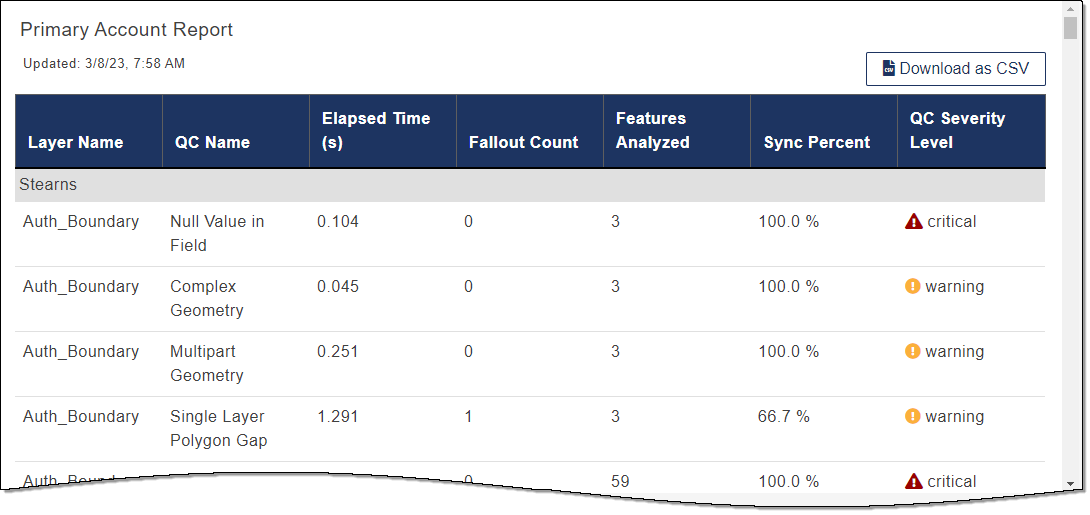
- Date & Time: The date and time the report was last updated.
- Agency: The name of the agency for the data that follows in the Primary Account Report.
- Layer Name: The layer the QC check ran against.
- QC Name: The title of which QC check was running when the feature failed, and the fallout occurred.
- Elapsed Time(s): The time it took to run the QC check for the specified layer.
- Fallout Count: The number of fallouts that occurred for the layer in the QC check.
- Features Analyzed: The total number of features that were analyzed in the layer when the QC check was run.
- Sync Percent: The percent of data processed in the QC check that was successful and is good.
-
QC Severity Level: The severity level assigned for the QC check fallout that occurred. Warnings include the following starting with the most severe.
-
 Critical: There is no export data package created.
-
 Warning: A data package was created with errors.
-
 Info: A data package was created.
-
- Download as CSV: Enables you to download a copy of the Primary Account Report in CSV format.